Your PC has enough to do.
Your game, OBS, Discord, a browser with too many tabs. Your automation doesn't need to be on that list. BetterStreams runs on our servers, so redeems, raids and subs keep firing with nothing of ours open.
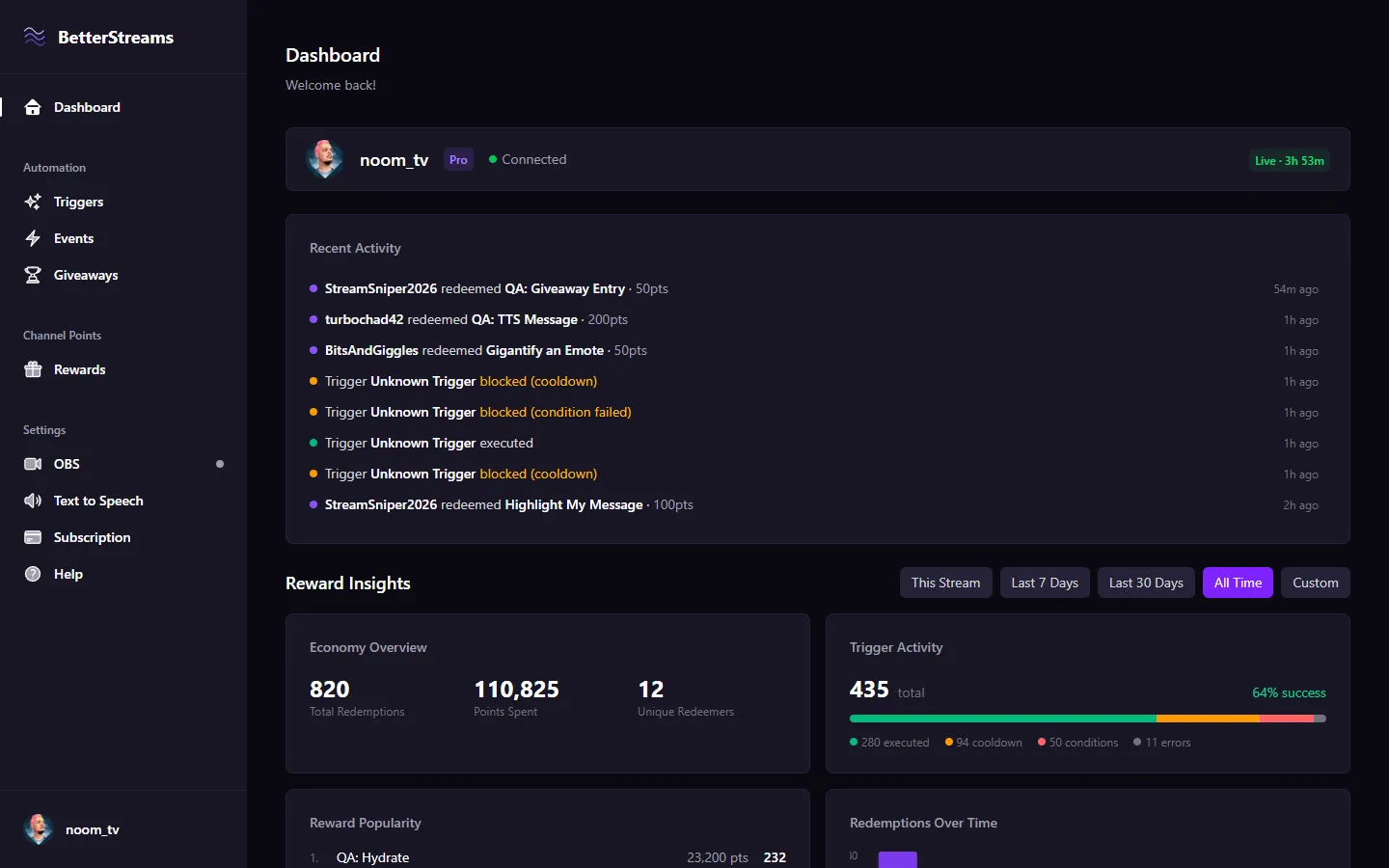
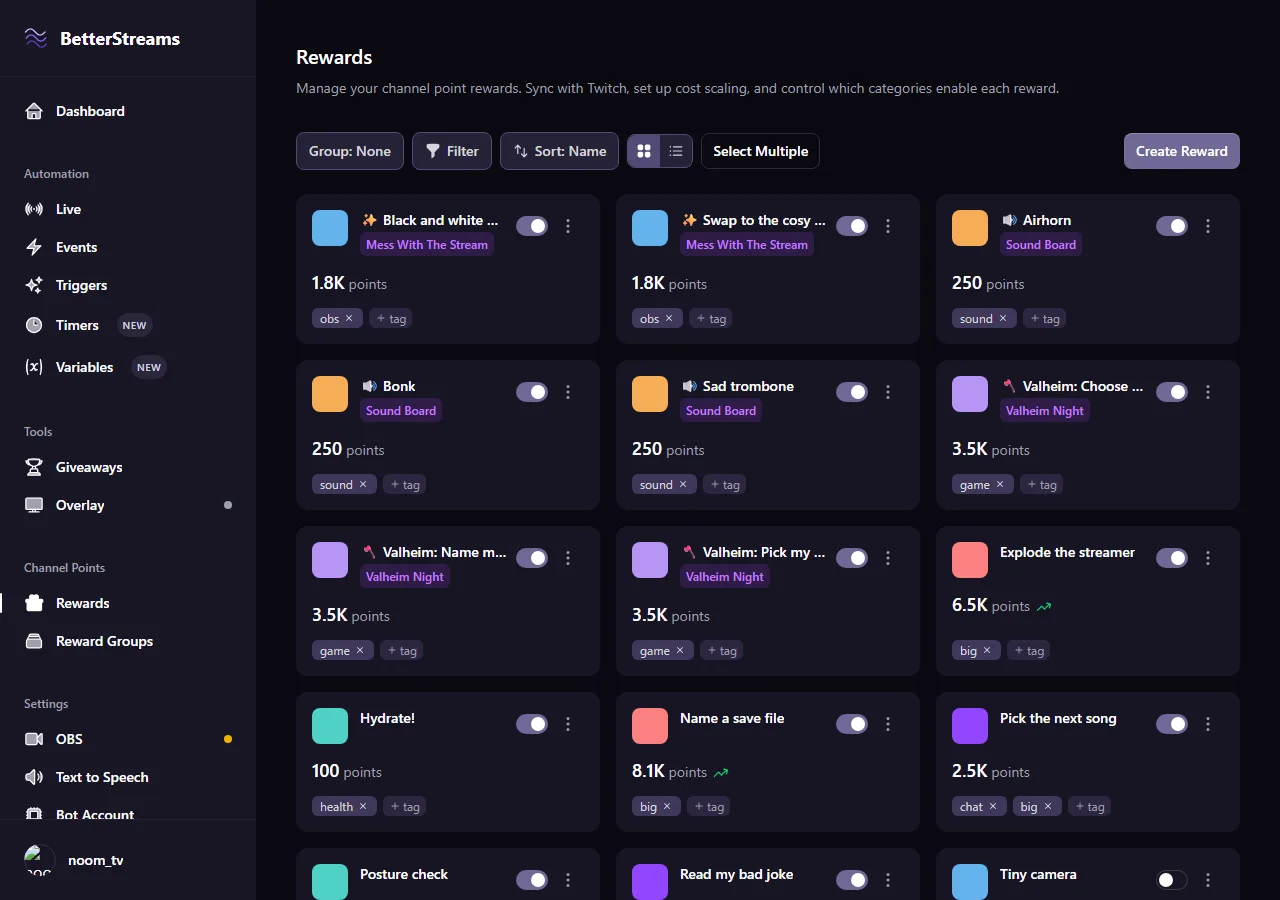
When this happens, if that's true, do this
That's the whole idea behind every automation you'll build. Pick something that happens on your channel, add any checks you want, then choose what should happen. It's all dropdowns, so there's nothing to install and nothing to write.
Someone redeems a reward, subscribes, raids you or cheers. A timer hits zero. You swap scenes in OBS. Any of those can kick an automation off.
This one's optional. Only while you're playing R.E.P.O., only after 9pm, only if they're a subscriber, only when your BRB scene isn't up.
Swap your scene, play a clip, read the message out loud, start a raffle, add five minutes to the subathon clock. Chain as many as you want, in whatever order.
On our computers, not yours.
Most stream tools are a program you install and leave running. This one isn't. You build your automations in a web page, then close it, and they carry on without you.
-
Nothing to install
No program on your PC and no plugin for OBS. If you can open a web page, you can use it.
-
Nothing to leave open
Close the tab, shut the laptop, walk away. Your automations keep going without it.
-
Check in from anywhere
Your phone, a tablet, the machine in the other room. Same account, same automations, nothing to sync.
The parts you'll spend the most time in.
Triggers to make things happen, rewards worth spending points on, OBS doing as it's told, and the numbers that tell you what landed.
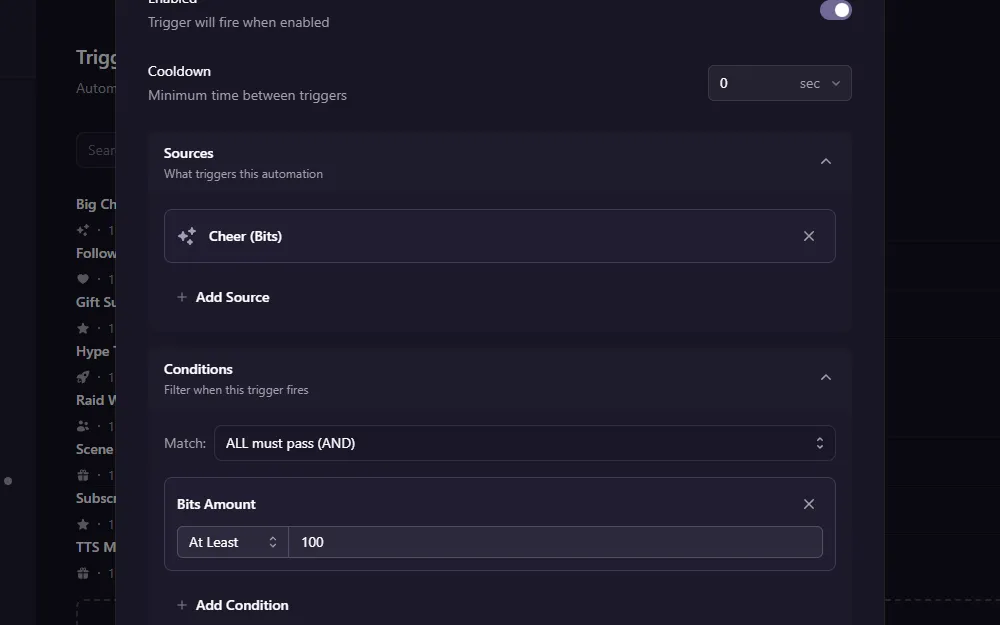
Smart Triggers
React to subs, raids, cheers, redeems, chat messages, OBS changes, and more. Add conditions, set cooldowns, and chain multiple actions from your dashboard.
Reward Management
Sync your Twitch rewards and auto-toggle them when you swap games. Tag rewards to filter, sort, and bulk toggle them. Auto-scale costs so viewers don't sit on huge piles of points.
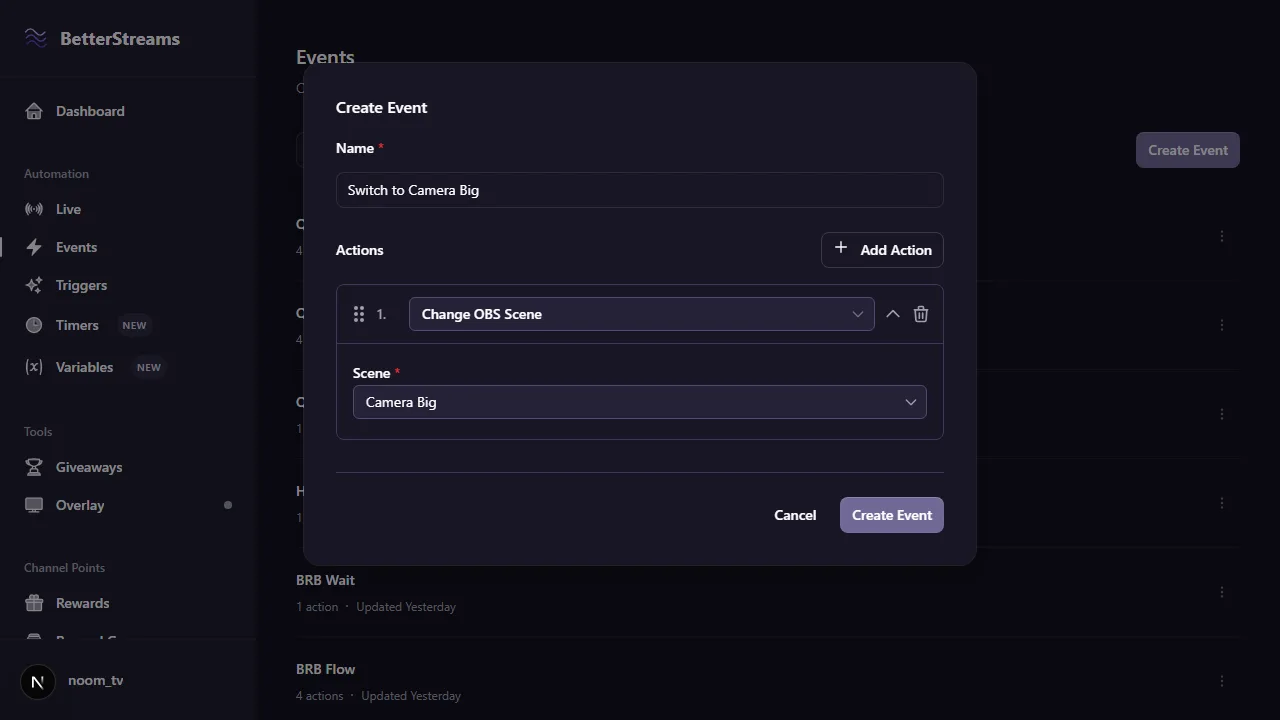
OBS Control
Let a redeem switch your scene, play a clip over your face, or turn the whole stream black and white. Scene changes can kick automations off as well, so it works in both directions. No plugin to install, and it runs on a Mac.
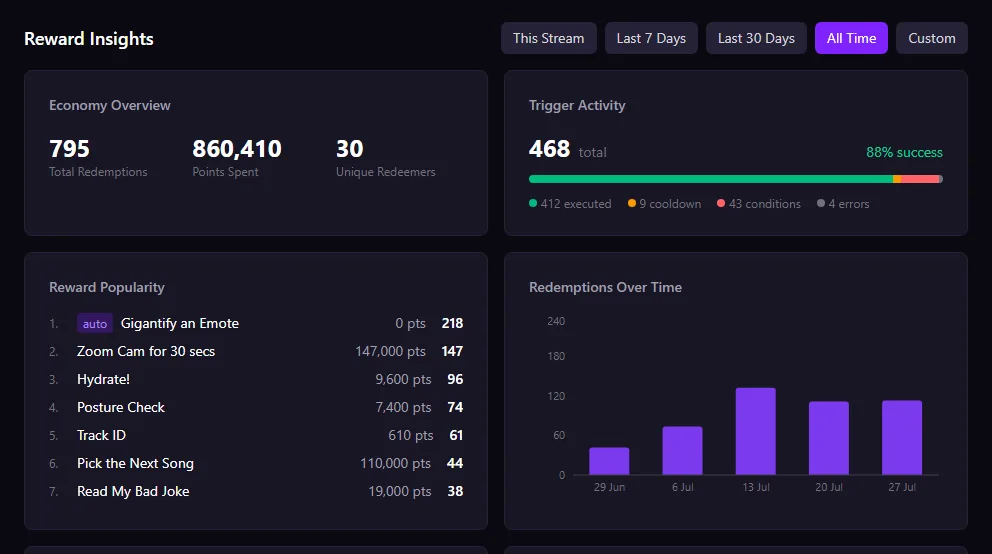
Reward Insights
Twitch doesn't tell you which rewards your viewers actually use. BetterStreams tracks every redemption: most popular rewards, total points spent, and engagement trends over time. Stop pricing by gut feeling.
Set one up and close the tab.
All the power, none of the scripting.
Flexible Conditions
Your triggers only fire when they should. Filter by stream category, time of day, subscriber status, viewer count, OBS scene, and more.
Stream Timers
Countdowns, repeating reminders, and scheduled timers that plug into your triggers. A break timer can swap your scene back and post in chat the moment it hits zero.
Text-to-Speech
Let viewers speak through your stream with channel point redeems. Cloud voices that sound like the ones you already know from other tools. Set the speed, the volume, and how long a message can be.
Giveaways
No more picking names from chat or tabbing out to random.org. Eight entry sources, eligibility rules, winner selection, all built in.
Overlay Alerts
Show alerts and giveaway widgets on stream. Pick a position, choose an animation, and style it to match your brand.
Custom Bot
Send chat messages as your own bot account instead of the default BetterStreams bot. Or send as yourself.
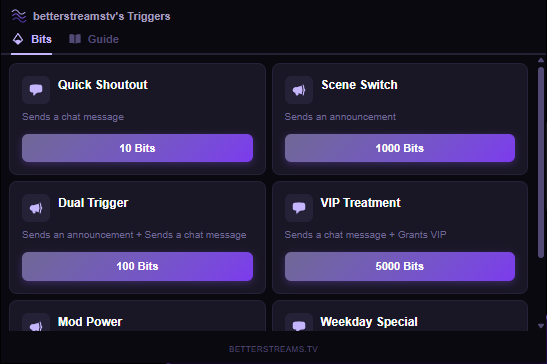
Viewers browse your triggers and activate them with Bits, right from your stream.
No guessing about chat commands or point costs. The channel guide shows everything you've set up, and the Bits menu lets viewers pick exactly what they want to trigger.
Most of BetterStreams is free. Pro is $8.99 a month.
No card to start, and a month is a month. Cancel whenever you like.
Free
$0/forever
Get started with stream automation for free.
Unlimited triggers
All trigger types (subs, raids, cheers, redeems, and more)
All conditions and actions
Unlimited timers for breaks and reminders
OBS integration and TTS
Twitch Extension (Bits triggers + channel guide)
Basic giveaways
Reward management
Reward insights, plus 7 days of redemption and giveaway history
Pro
$79.99/yr
$6.67/mo — save 26%
For streamers who want to automate without limits.
Everything in Free
Multiple events per trigger, with failure handling
Scheduled timers that fire at a set time of day
Run actions simultaneously, randomly, or by rarity
Auto-toggle rewards by category and auto-scale costs
Multi-source giveaways, cooldowns, and sub multipliers
Full redemption, giveaway, and queue history
Questions & Answers
Do my automations run when my browser is closed?
Yes. Your automations run on our servers, not in your browser. Redeems, raids, subs, cheers, timers and giveaways all keep firing whether or not you have BetterStreams open anywhere.
What do I need to have open?
OBS, which you're running anyway because you're streaming. Add the BetterStreams overlay as a browser source once and scene switches and text to speech work from there. Everything else needs nothing open at all.
How does BetterStreams work?
BetterStreams connects to your Twitch account and listens for events like subs, raids, cheers, and channel point redeems. When an event matches your trigger conditions, it runs your actions automatically, like switching OBS scenes, playing TTS, or starting a giveaway.
What triggers are supported?
BetterStreams reacts to channel point redeems, subs, gift subs, raids, cheers, follows, chat messages, hype trains, OBS scene changes, giveaway events, timers, and Bits used through the Twitch Extension. Each trigger can be filtered with conditions like stream category, time of day, subscriber status, or OBS scene.
What is the Twitch Extension?
The BetterStreams extension adds a panel to your Twitch channel page. Viewers can browse all your triggers in the Guide tab, and activate specific ones with Bits in the Bits tab. Install it from the Twitch Extensions manager and connect it to your dashboard.
Can I see which rewards are popular?
Yes. The dashboard tracks every channel point redemption automatically: most popular rewards, total points spent, unique redeemers, and trends over time. Twitch doesn't surface this data, so BetterStreams logs it for you.
Does BetterStreams have stream timers?
Yes. Create countdown, repeating, or scheduled timers and control them from the dashboard with live countdowns. Timers fire your triggers when they hit zero, conditions can check whether a timer is running, and automations can pause until a timer finishes. Timers are unlimited on Free, and your automations can create them too. Pro adds scheduled timers that fire at a set time of day.
Is BetterStreams free?
Yes! The free tier includes unlimited triggers with access to all trigger types, all conditions, and all actions including TTS and OBS control. Pro starts at $8.99/mo (or save with $79.99/yr) and adds multiple events per trigger, play modes, failure handling, advanced giveaway settings, reward cost scaling, and longer history.
Do I get a free trial?
Every new account gets a 14-day free trial of Pro. All Pro features are unlocked from day one, no credit card required. After the trial, you can upgrade or stay on the free tier.
Does it work with OBS?
Yes. BetterStreams drives OBS through the overlay browser source you add to your scene, so scene switches, source toggles and filters all work while you're streaming. There's no plugin to install and it runs the same on a Mac.
How do I get started?
Sign in with your Twitch account, connect OBS, and create your first trigger. The whole setup takes less than five minutes. No code, no scripts, no bots to configure.
What happens if I cancel Pro?
Your triggers and settings stay exactly where they are. Anything using a Pro-only feature gets flagged so you can edit it, but nothing is disabled or deleted. Upgrade again anytime to pick up where you left off.
Guides on stream automation and channel points.
Every Channel Point Reward Fits One of Three Buckets
Most channel point advice is a pile of ideas. This is a sorting system instead. Three reward buckets, how many to start with, and a two-week test for whether a redeem is actually working.
July 4, 2026Twitch Gave Every Streamer Channel Points. Now What?
Twitch just gave every streamer channel points, no Affiliate required. What changed, the payout catch the community flagged, and a sane day-one setup.
June 3, 2026Automate Without Code: 4 Stream Automations Worth Building First (and the One Beginners Waste a Weekend On)
Most streamers who try to automate something bounce off the tools. The fix is picking a smaller first project. Four starter automations that ship fast and save attention every stream.
We've been at this a while.
BetterStreams started as a browser plugin, built when channel points were brand new and Twitch hadn't given anyone an API for them. The thing it made them do was control OBS. It grew into one of the first channel point integrations anyone had built, and we demoed it on Twitch's dev stream.
Six years on, the whole thing has been rebuilt from the ground up. Same job, much better tools, and a lot fewer things held together with tape.
Give your PC one less thing to do.
Sign in with Twitch and build your first automation. Free tier, no card, and a 14-day Pro trial to see the rest.