You made the reward. Now see if anyone's redeeming it.
Channel points analytics for Twitch streamers who've been running on gut feel. Every redemption stays on record, including the ones Twitch drops the moment you clear the queue.
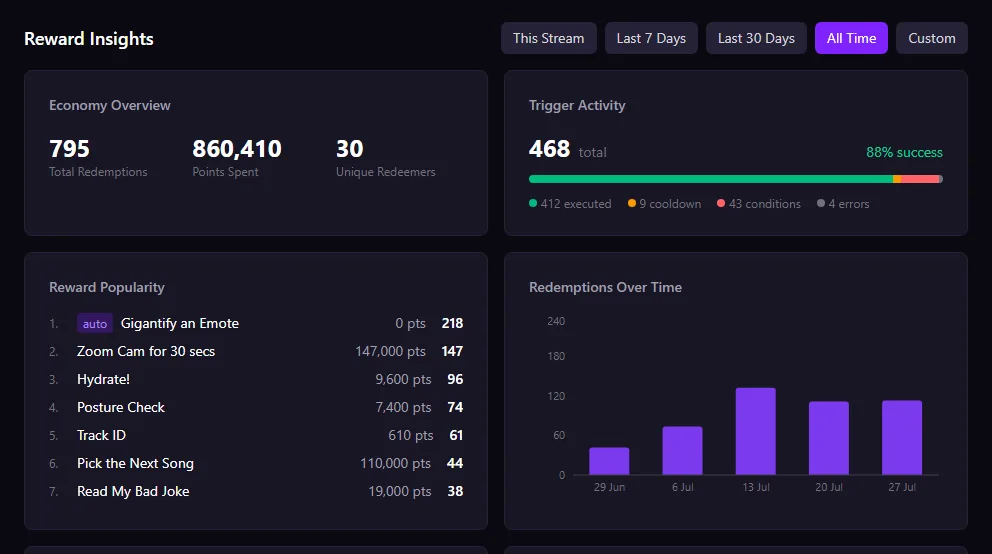
Reward Insights sits on your BetterStreams dashboard home page, under the things you’re already checking. There’s no separate analytics app to open. Pick a range at the top of the section (This Stream, Last 7 Days, Last 30 Days, All Time, or a custom window) and all four cards move together.
Say you added a reward last Thursday called Name My Next Valheim Boat, priced it at 5,000 points, and were quite pleased with yourself. Up to now the only way to find out whether it worked was to remember. You’d come away with a rough feeling that it came up once or twice, and then you’d keep it out of hope or quietly delete it. Set the range to Last 7 Days and the number is right there.
The economy overview across the top gives you the shape of the week at a glance: total redemptions, points spent, and how many different viewers did the redeeming. Two hundred redemptions from nine people is a very different stream from two hundred from ninety.
Redemptions get written down as they land, and once one is on the record it stays there. Clear your redemption queue as aggressively as you like, mark the lot complete, and our copy is untouched. Nothing gets thinned out later either. On Twitch, marking it complete is the thing that erases it.
The habit that makes this worth having is a small one. After a stream, or over coffee the next morning, open the dashboard, set the range to This Stream, and look at which reward topped the list and whether the points column agrees with it. Then check the bars for a spike and go find that minute in the recording. If a reward you had high hopes for isn’t there, you’ll know now instead of a month from now. If something you’d half forgotten about is sitting at the top, that’s the one to build on, or the one to charge more for.
What the Reward Insights section tells you
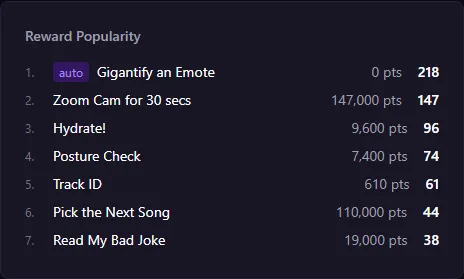
Rank every reward by how much your chat actually uses it
A ranked list of your rewards with the redemption count and the points spent sitting side by side, over whatever period you pick. Your most redeemed reward and your most expensive one usually aren't the same reward, and both columns are on screen together. Read the top five and you've got your answer on whether that new reward landed or whether it's time to bin it.
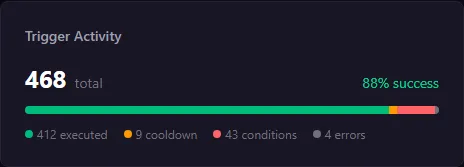
Find out why an automation didn't fire
Every trigger comes with a breakdown of what happened to it. Executed, held back by a cooldown, stopped by a condition, or errored. When a reward looks like it's ignoring people, you don't have to guess whether your cooldown is too long or a condition never matched. The breakdown tells you which, and you go and change that one thing.
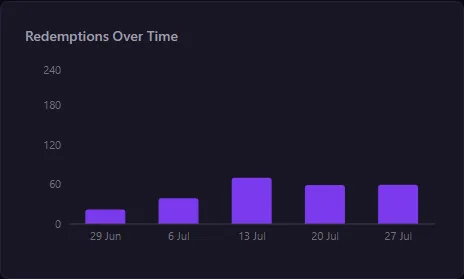
Spot a spike, then go find it in the VOD
Redemptions bucketed into bars across the range you chose. When one bar stands taller than the rest, that's a moment worth chasing. Open the recording, scrub to that time, and watch what you were doing and what chat was saying when everyone started redeeming at once. Most streamers never think to go back and look for it.
What's free, and what Pro switches on
Free
- Every redemption is recorded and kept, whatever plan you're on
- This Stream analytics, free at every tier
- A rolling week of history across all four cards
Pro
- The full history, back to your first recorded redemption
- Any range you like, including custom start and end dates
- Cancel and you lose nothing. The longer view switches off and waits for you
Questions & Answers
Doesn't Twitch already show me my channel point redemptions?
Only until you mark them complete. Once a redemption is cleared out of the queue it's gone from Twitch's side, and there's no way to count it later. Streamers have been asking for redemption analytics on Twitch's own forums for years, and the advice they get is to keep a spreadsheet or never clear the queue. BetterStreams records each redemption as it happens and keeps it.
Which of my channel point rewards is the most popular?
The Reward Popularity card answers exactly that, ranked over whichever range you pick. It puts points spent next to the count, so you can tell apart a reward everybody redeems and a reward that quietly soaks up most of your economy.
How far back does my redemption history go?
Back to your first recorded redemption. Nothing is ever deleted. On the free plan you're reading a rolling week at a time, plus This Stream whenever you want it. Pro opens the whole thing up, including custom date ranges.
What happens to my analytics if I cancel Pro?
Nothing happens to them. The longer view switches off and every redemption stays exactly where it is. Resubscribe whenever you like and the full history is there waiting, already filled in. Wiping it would mean buying Pro and then sitting around for a month while the data built back up.
Can I see how one specific reward trends over time?
The timeline counts all redemptions in each time bucket rather than splitting them per reward. What you can do is narrow the whole section to a range and read that reward's count and points out of the popularity list, which answers the same question for any period you care about.
Do Twitch's built-in rewards show up?
Yes. Gigantify an Emote, Highlight My Message and the rest get logged like anything else and are labelled auto in the list. They cost zero points by design, so they often rank high on count while the points column stays at zero. They're part of how your chat uses rewards, so leaving them out would give you the wrong picture.
Where does this live?
On your BetterStreams dashboard home page, in a section called Reward Insights. There's no separate analytics app to open. The range switcher at the top runs This Stream, Last 7 Days, Last 30 Days, All Time, and a custom window.
Guides that go deeper.
What Twitch Doesn't Tell You About Your Channel Point Rewards
Channel points have no analytics. No redemption history, no popularity data, no trend lines. Here's what that means for your rewards and how to track it yourself.
July 19, 2026Every Channel Point Reward Fits One of Three Buckets
Most channel point advice is a pile of ideas. This is a sorting system instead. Three reward buckets, how many to start with, and a two-week test for whether a redeem is actually working.
July 4, 2026Twitch Gave Every Streamer Channel Points. Now What?
Twitch just gave every streamer channel points, no Affiliate required. What changed, the payout catch the community flagged, and a sane day-one setup.
See what your channel points are actually doing
Connect your Twitch account and BetterStreams starts logging redemptions from your next stream. Free to start, and nothing you log ever gets deleted.